Beta
Beta firmware program enrollment and rollback information for compatible AtGames devices.
Beta Firmware Program
The beta firmware program gives you early access to upcoming firmware releases before they are available to all users.
No active beta release
There are currently no new firmware releases or features available for beta testing. Please check back later for future beta updates.
No direct rollback path
If you unenroll a device from the beta program, it will stop receiving beta updates but will remain on the beta firmware version it already has installed. The only way to return to a standard firmware version is to perform a factory reset and update the device again outside of the beta program.
How to Enroll
Enrollment is managed from your AtGames account on atgames.net. Go to your Account page, open the Devices section, and toggle beta enrollment on or off for each registered device individually.
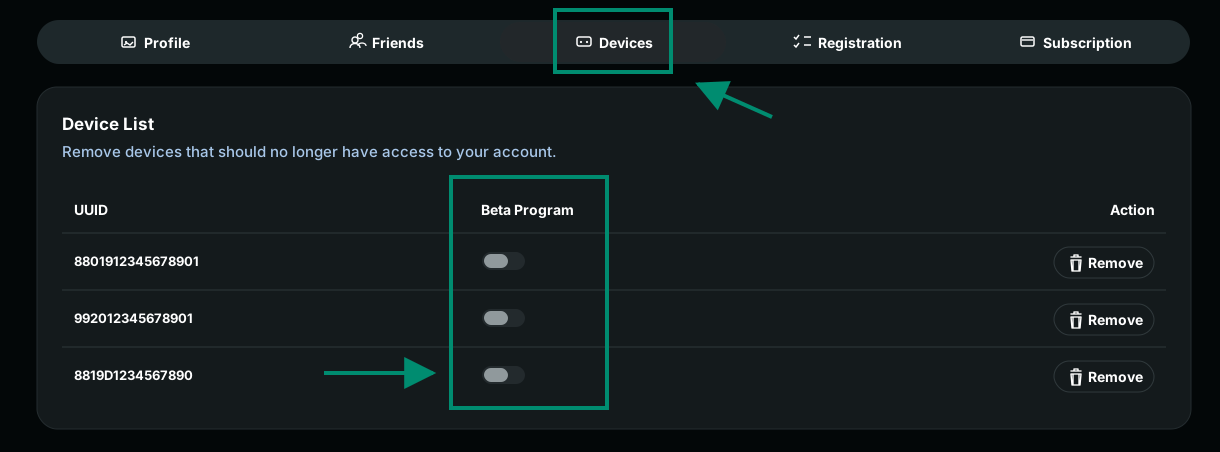
Once enrolled, the device will receive beta firmware updates automatically the next time it checks for updates.
How to Leave the Beta Program
- Go to your AtGames account, open the Devices page, and turn off beta enrollment for the device.
- After beta enrollment is turned off, the device stops receiving future beta firmware updates, but the firmware version already installed on the device does not roll back automatically.
- Choose how you want to return to standard firmware:
- Wait for the next public firmware release. When a newer standard release is available, update the device normally to move back onto the public firmware path.
- Perform a factory reset, then update the device again outside of the beta program if you need to return to standard firmware sooner.
Factory reset removes local data
A factory reset erases settings and content stored on your device and returns it to the factory firmware state. If your games are associated with your AtGames account, you can reinstall them after signing in again.